
Call Us Now: (234)7044777269, 08055213953, 08033965923, 08087180818, 01-7653320
This is powerful IT management software that is used to protect your valuable data, manage employee’s computer usage and online activity, and ease system management. It effectively safeguards intellectual property, improves work productivity, and reduces IT management workload for organizations of all sizes. IP-guard provides unmatched and comprehensive features to help you solve most of the intractable problems which are caused by the extensive use of computers in offices. It consists of 14 modules. In order to meet different customers’ needs and save money for customers, 14 modules can be optionally selected and packed according to different management requirements.
MODULES
The Application Management Module enables you to control users’ application usage during specific time range, audit application activity and record application activity in detail. Therefore, you can learn more about users’ PC usage and analyze their work performance. Application Management Module can help you effectively filter non-work related and risky applications to stop time wasting, data leakage and make users comply with corporate policies.
2. Bandwidth Management
Indiscriminate Internet surfing, goofing around online aimlessly and bandwidth guzzling downloads by Internet users often leave enterprises with insufficient bandwidth for business critical applications. Bandwidth Management Module not only helps you effectively control, easily optimize and reasonably distribute the existing bandwidth, but also helps you prevent bandwidth abuse and resultant chocking.
3. Basic Management
Basic Management Module records all basic information of managed computers. It assists you manage computer settings and evaluate users’ computer usage as well as work performance.
4. Document Management
Document Management Module not only helps you effectively manage users' document actions and block specific actions, but also records the detailed document actions of every user. With it, document information leakage has no way to take place. In addition, it backs up documents before they are modified or deleted in order to prevent unintentional and malicious data loss.
5.Device Management
Device Management Module helps you effectively control the access permissions of various kinds of devices, e.g., storage device, communication device, USB device, Bluetooth device, dial-up device, burning device, network device. It effectively and efficiently prevents sensitive data from leaking out via these devices.
6. Email Management Module
Email Management Module automatically saves a copy of every incoming and outgoing email. Even when users delete their emails, it still has a copy for you to review. Moreover, it can block specific email accounts from sending emails to specific recipients, prohibit users sending out emails with specific subjects as well as attachments, or limit the size of emails so as to stop accidental and malicious data leakage
7. Instant Messaging Management
With IM Management Module, you can find out how long does every user spend on chatting, who they talk to, and is the conversation work-related or not. It not only can record conversation duration, participants, and both sides of conversations, but also can block users from sending sensitive data via IM applications.
8. IT Asset Management
IT Asset Management Module enables you to get a grip on your hardware assets, software assets and IT asset changes. It can automatically detect systems vulnerabilities and updated patches, and provides effective solutions. In addition, its software deployment function empowers you to deploy any needed software to remote computers through a single console.
9. Network Management
Network Management Module enables you to control the communication direction and block malicious network ports in order to keep away from risks and threats. Unauthorized computers have no ways to access internal computers and connect to the internal network by blocking specific access permissions. Therefore, you can protect your computers before they expose to risks.
10. Print Management
Undeniably, file printing is one of the major ways to let information out of a company. Print Management Module helps you manage and record employees’ print activity, and backs up printed files. It effectively protects your confidential data, and helps you save millions of dollars in papers, wasted time and data loss.
11. Remote Maintenance
Remote Maintenance Module enables you to take control of any computer to perform complex remote maintenance at any time. You can take over screen, mouse and keyboard in real time with impressive performance and work like you are there. It allows you to quickly and easily diagnose and resolve the problems. Moreover, you can use it to demonstrate system operation to remote users easily.
12. Removable Storage Management
Removable Storage Management Module enables you to grant different access permissions to different users, limit the access permissions of specific removable storage devices, and well manage all the removable storage devices used within your organization. Moreover, its encryption function can encrypt all the data stored on any removable storage devices so as to effectively protect your confidential data and avoid costly data loss.
13. Screen Monitoring
Screen Monitoring Module enables you to watch remote users’ real-time PC activities. Whenever and wherever you are, you can easily view users’ desktop activities. Are they working or playing PC games during office hours? You won’t miss any detail of their actions.
14. Website Management
The Website Management Module enables you to control who can browse websites and what websites can be accessed. It not only records websites visited by users, but also records how long did the users spend on different web pages and how frequently do they visit the websites.
SYSTEM ARCHITECTURE
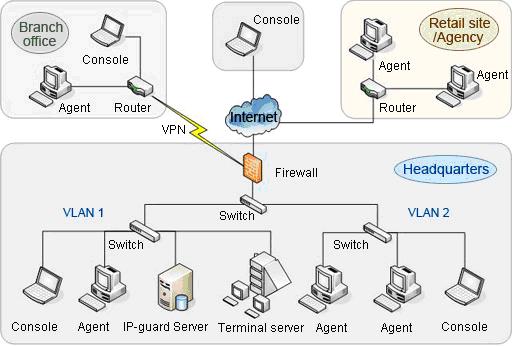
Three components: server, console and agent. Administrators can install different components on the computers they want to manage.
Server
Server is installed on a computer with high storage capacity and high performance.
Console
Console is installed on an administrator or supervisor’s computer.
Agent
Console is installed on an administrator or supervisor’s computer.
System Requirements
|
Components |
Requirements |
|
|
Agent |
OS |
Windows 98, Me, NT4, 2000, XP, 2003, Vista, 2008, and 7 |
|
Minimum |
Processor: celeron II 433 |
|
|
Recommended |
Processor: Pentium 4 |
|
|
Console |
OS |
Windows 2000,XP,2003,Vista,2008,and 7 |
|
Minimum |
Processor: Pentium III 500 |
|
|
Recommended |
Processor: Pentium 4 |
|
|
Server |
OS |
Windows 2000 SP4, XP SP2, 2003 SP1, Vista, 2008,and 7 |
|
Minimum |
Processor: Pentium III 500 |
|
|
Recommended |
Processor: dual-core or quad-cord |
|
Construction Engineering:
+234-8033965923
+234-8055213953
othuks@o2sdevelopment.biz
Information & Communication Technology
+234-8087180817
-07044777269
-017653320
-08056222249
info@o2sdevelopment.biz
Once again great success has been happening for all of our
clients. To find out more check out the full blog post in our blog
section.
Top 10 tips and tricks to make your start up business a success
can be found here. Check out the full blog for other great
ideas.
Copyright 2012 | o2s Development Services Ltd | All rights reserved.